
Less hassle, more flow.
Tutor Flow streamlines your feedback routine, so your breaks can go back to being breaks and you can log off when your last student does.
A Chrome extension for Ringle tutors. Free for 10 days, then $6.99 a month or $76.89 a year. Annual subscribers get one month free compared to monthly.
If you’ve been with Ringle for a while, you’ll likely agree that teaching is the easy part. By now, you’ve probably discovered that:
Feedback reports take longer than the time allotted for them
A 20-minute lesson gets a 10-minute break, but the feedback report might take you 12. Finish a class late or fall behind just once and before you know it, you’re spending 45 minutes of unpaid time catching up on feedback after your last class ends.
The Ringle Docs interface isn’t the ideal setup for the task at hand
You’re supposed to type what students say verbatim. But you’re also trying to track mistakes and opportunities for correction, which can get lost over the course of a 40-minute lesson. But every bold, highlight or correction means reaching for your mouse mid-sentence and clicking around on the screen, losing valuable seconds (and student output) in the process.
It’s hard to keep your calendar(s) straight, and a mix-up can cost you
It’s time to set your availability for the month, but your Google Calendar is in another tab, and you have to go through every week a day at a time to make sure everything lines up.
You don’t even want to think about the special headache that is trying to open a recurring “Private Slot” for your favorite students while they patiently wait for you to triple check that there are no conflicts — only to realize that you’re already 5 minutes past the end of your lesson.
Have to cancel a lesson because you accidentally double-booked yourself anyway? You’re now at risk of losing stars, GST status, and promotion points, not to mention potentially upsetting a student. If you’re extra unlucky, it might be a strike, reduced profile visibility and lost bookings — all because the calendar situation is a mess.
You’re not always sure whom you’re about to teach
The student name on the lesson page says “gimminjun” (or perhaps says nothing at all), and there are three feedback reports from six months ago addressed to “Mike”. Mike remembers you, which is why he’s decided to book lessons with you again, but what do you remember about Mike? His level, habits, and learning goals are all buried in lesson notes that you can’t access.
Mark mistakes without missing a word.
A few simple shortcuts take care of bolding, insertions, corrections, and highlights, so nothing your student says slips by while you’re clicking around.
- *word*Type an asterisk and the closing one appears. Type your text, press Tab or Enter, and it turns bold.
- [word]Type an opening bracket and the closing one appears. Press Tab or Enter, and the text inside turns Ringle orange for a quick insertion.
- -wordType a hyphen before a word you can already tell is incorrect, and press Tab. It strikes out the word just like ⌘/Ctrl 2 would. Type your correction and press Tab again to keep typing in Ringle’s default grey.
- “ ”Type an opening quotation mark and the closing one appears, so whatever you type goes inside the quote. Press Tab to jump past the closing mark, or Enter to start a new line after it.
- ⌘/Ctrl 3 · 4⌘/Ctrl 3 turns yellow highlighting on and off, and ⌘/Ctrl 4 switches between pink, green and no highlighting. These can be triggered from both the number row and the 10-key pad.
- ⌄—^As you type, the page scrolls with you, so the line you’re on never drops out of sight.
- Tт −+Ringle’s text size buttons have been adjusted to drastically expand size options and Tutor Flow remembers your setting between lessons.
Corrections, quotations, boldings and highlights, all from the keyboard.
Our expanded zoom feature makes it possible to choose the right text size for your setup, screen size, and comfort.
However long the transcript gets, the line you’re typing stays in view.
Bold a term in your paraphrase. It arrives as a Key Expression.
Usually, the feedback report process starts once your student leaves. You exit the classroom, write them a message, and then go back through your lesson notes to decide which feedback blocks are “Detailed Feedback”-worthy. You then have to make another pass to highlight each Key Expression in the ‘After’ field and click “Add to Key Expressions,” one . . . at . . . a time.
That alone can eat up most of a 10-minute break.
Tutor Flow eliminates this redundancy by activating Ringle’s purple export arrow inside the classroom view, so that you can export high-quality feedback blocks in real time. As you go over the lesson transcript with your student, simply bold the words and phrases you want them to remember and click the arrow. Tutor Flow stores the paraphrase and delivers it to the Feedback Report upon your arrival, with every bolded phrase in the ‘After’ section already marked as a Key Expression. That means that once you’ve completed the message to your student, all that’s left is writing your explanations and hitting ‘Submit’. Try it below.
Two paraphrases exported to the Feedback Report, Key Expressions included.
Small screens can make it hard to comfortably read what you’re writing in your feedback message to students. Tutor Flow adds zoom buttons to the text editor to make proofreading easier on the eyes.
Deleting feedback cards from Ringle’s Feedback Report jumbles up the Key Expressions for every card that follows. Tutor Flow’s Key Expression Repair puts them back where they belong.
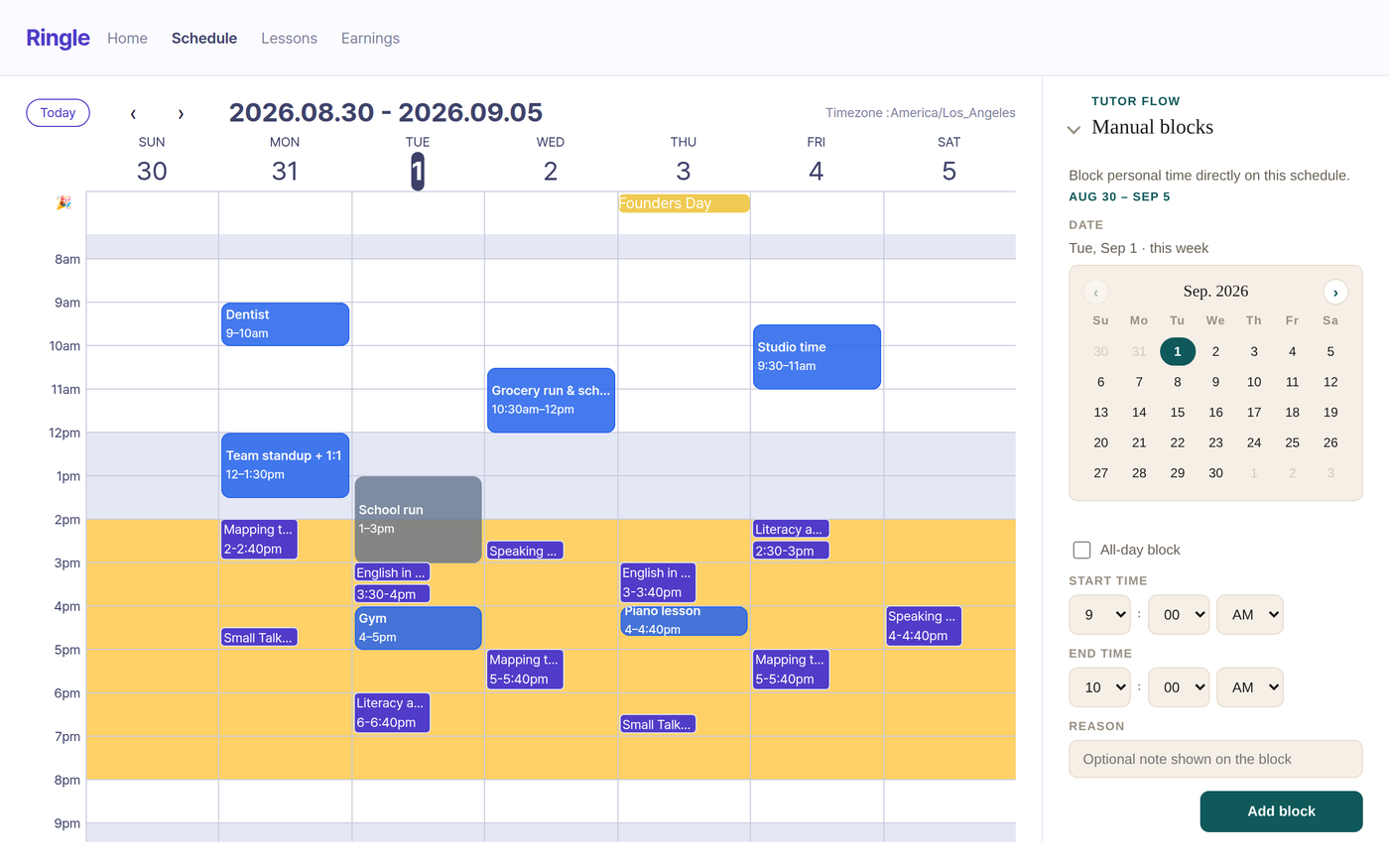
Get an actual overview of your schedule before you open a timeslot.
Sign in with Google Calendar, select which calendar(s) you want displayed, and all your important events will show up on Ringle’s schedule page. Mouse clicks are disabled on slots covered by Tutor Flow’s calendar overlays to prevent errant clicks from opening a timeslot by accident. It also notifies you of any potential conflicts that affect a recurring timeslot before you confirm availability. And since Tutor Flow has read-only access, there’s no danger of any changes being made to your personal calendars from our end.
Your Google Calendar events, right on the schedule page.
- ·Regular events and holidays each get their own color, so they stand out.
- ·The Manual Block feature allows tutors to block off time by hand for anything that hasn’t yet been added to your calendar.
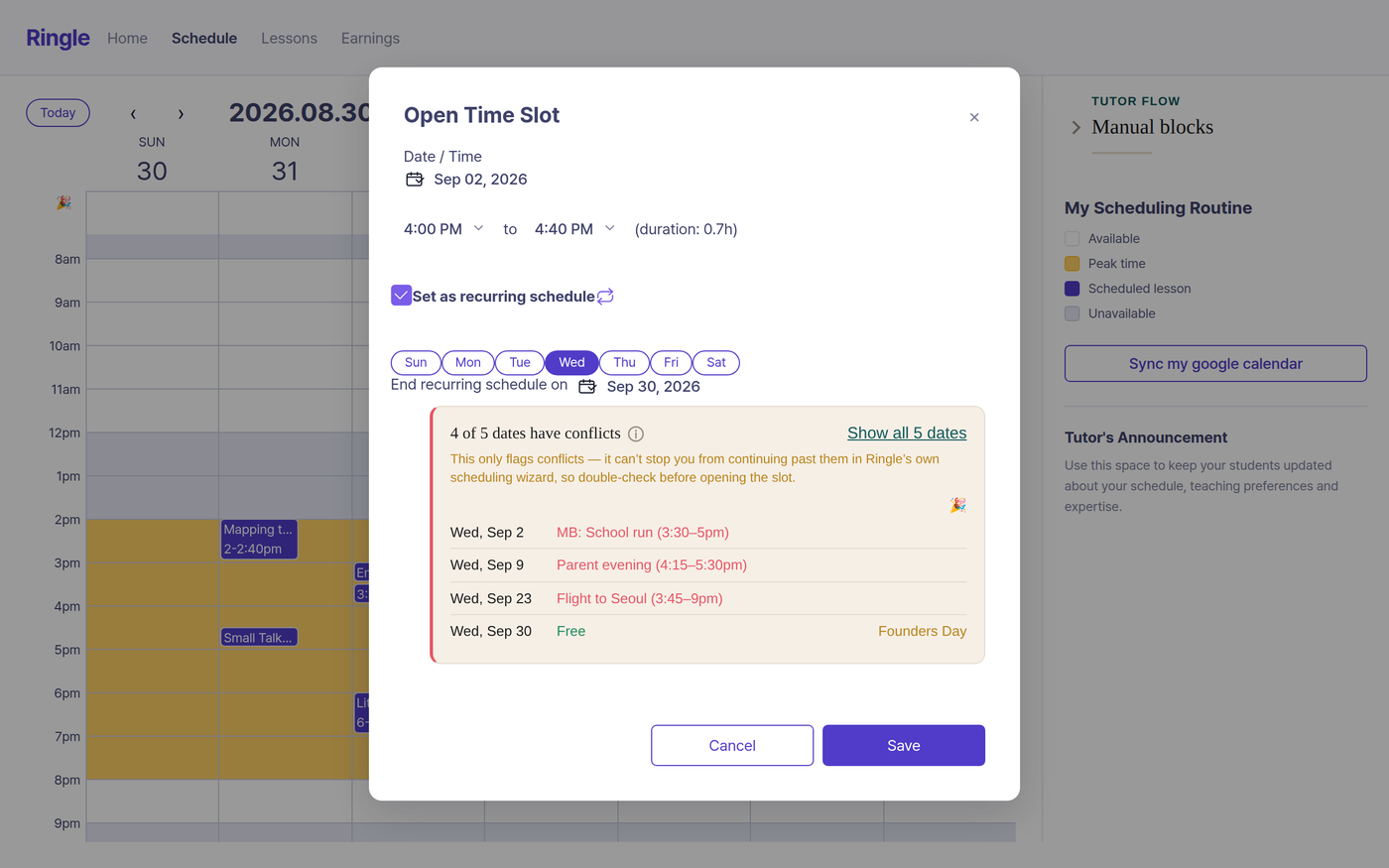
Tutor Flow’s Calendar Defender allows tutors to spot scheduling conflicts immediately.
- ·Want to offer a favorite student a recurring class every Monday, 4:00–4:40 p.m., for the next four weeks? Tutor Flow checks every one of those Mondays against your calendar in an instant.
- ·If any of them clash, you’ll see a list of conflicts to work around before you confirm the slot. No more clicking through your calendar week by week.
Never go into a lesson blind.
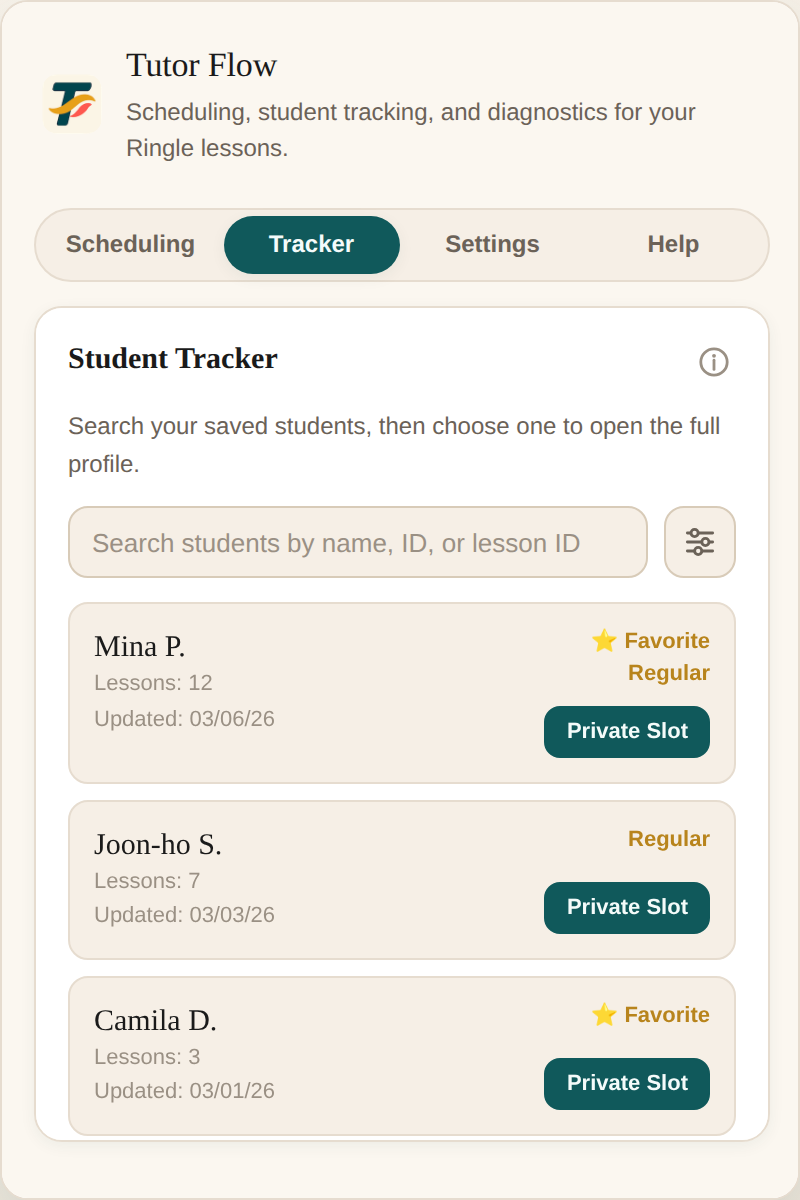
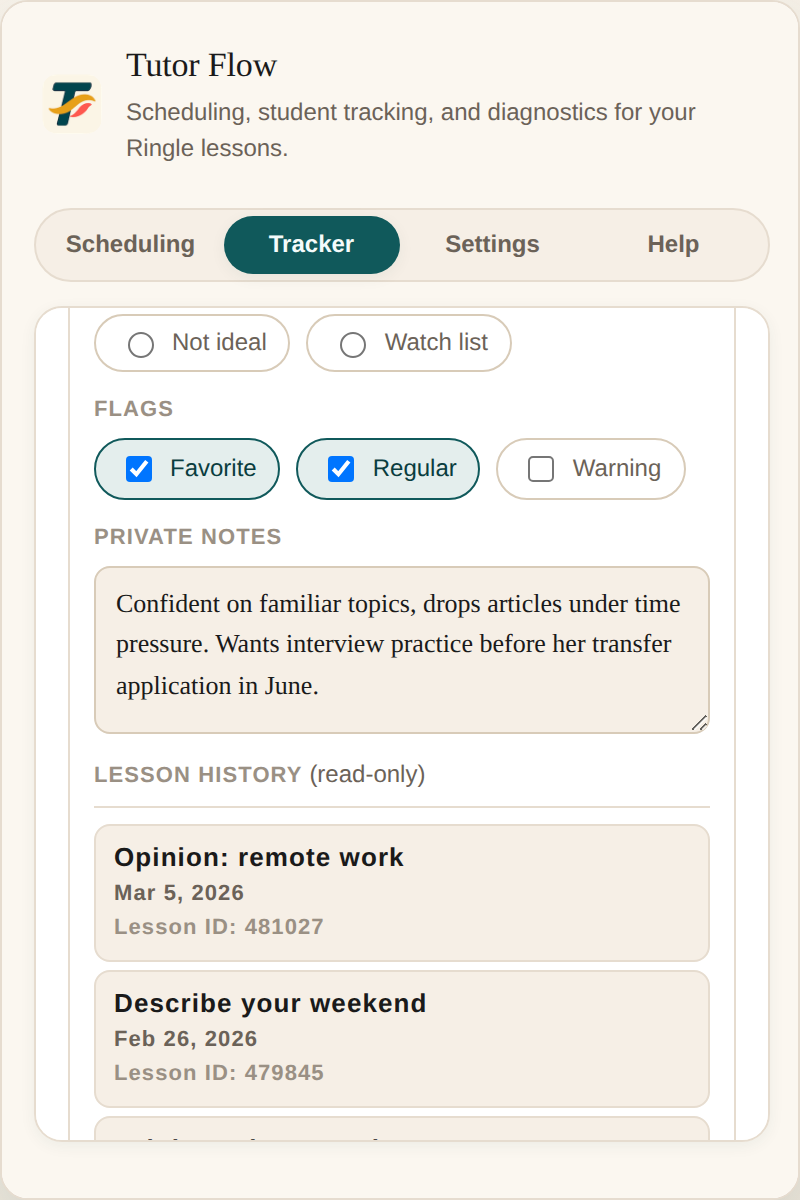
Look up anyone you’ve taught by name or lesson ID. Tag regulars and favorites so they’re easy to find.
Keep notes on each student’s level and habits or anything else you want to remember about them. Your notes will be there the next time they book, whether that’s next week or next spring.
Built by a tutor, for tutors.
Tutor Flow started as one Ringle tutor’s quest to find a way to survive long days of back-to-back lessons with his sanity intact. It has been used and perfected in real lessons since day one, and after many tweaks and adjustments, the days of drowning in backlogged feedback reports are a thing of the past!
As it has in the past, Ringle may make tweaks to the design and structure of its site in ways that affect Tutor Flow’s functionality. Our built-in error reporting features allow tutors to submit any bugs or issues they encounter along with information about the page on which they occur in order to help our support team get the extension back up and running ASAP. Any major fixes will be recorded in the changelog.
Read the changelog →How it works
Four steps and you’re set.
Install from the Chrome Web Store
Add it to Chrome and pin it to the toolbar for easy access.
Start your free trial
Visit our Merchant of Record, Creem.io, to purchase a subscription plan of your choosing. After checkout, paste the license key (which will be delivered via email) into the extension to activate. The license field can be found under the ‘Settings’ tab.
Connect Google Calendar
Give Calendar Defender access to Google Calendar so it can display your events on Ringle’s schedule page.
Teach
Open your next lesson and start teaching. Tutor Flow is ready to go.
What Tutor Flow can see, and where it goes.
Tutor Flow can read your Google Calendar, but its read-only access prevents it from making any changes.
Your events show up on your screen only. They’re never sent to Ringle or anyone else.
The content of your student tracker is saved locally in Chrome, for your eyes only.
If something breaks, Tutor Flow can send an error report to our support team so it can be fixed.
Pricing
Every feature is available on both plans, and the first 10 days are free.
One month free, compared with paying monthly.
Month to month, cancel whenever you like.
Prices in USD. Tax is calculated at checkout. No payments will be processed until your 10-day trial ends.
Already installed? Start your trial and get your license key.
Questions
Less hassle, more flow.
Try it free for 10 days and say goodbye to backlogged feedback reports.
Get Tutor Flow{{ lightboxCaption }}